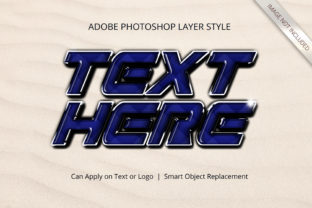
Mastering the Photoshop Game Title Layer Style: A Professional Guide to 3D Text Effects
In the competitive landscape of digital gaming, visual identity is paramount. The title screen is often the first point of contact between a player and a game, setting the tone for the entire experience. Among the various tools available to designers, the Photoshop Game Title Layer Style has emerged as a robust solution for creating immersive, three-dimensional typography without the steep learning curve traditionally associated with 3D modeling software. This approach allows creators to transform flat text into striking, volumetric assets that demand attention.
The core appeal of this specific layer style lies in its ability to democratize high-end design. Historically, achieving a realistic 3D effect required complex workflows involving extrusion, lighting setup, and material mapping within dedicated 3D applications. However, modern Photoshop workflows have evolved to integrate these capabilities directly into the layer system. By leveraging smart objects and pre-configured layer styles, designers can produce professional-grade results with a fraction of the time investment. This article explores the mechanics, advantages, and strategic application of this technique to help you determine if it fits your current project requirements.
Understanding the Mechanics of the 3D Effect Style
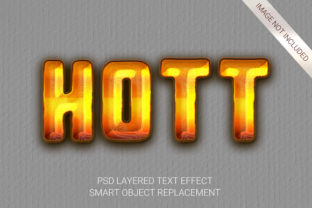
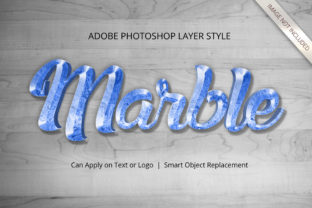
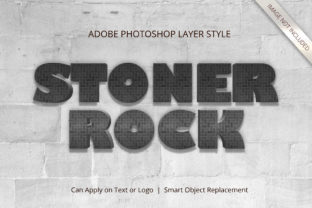
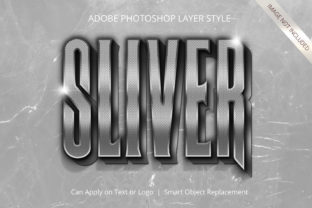
At its foundation, the Photoshop Game Title Layer Style operates on the principle of non-destructive editing. Unlike traditional methods where effects are baked permanently into pixels, this style utilizes a combination of smart object replacement and adjustable layer attributes. When a designer selects a template or style based on this methodology, they are essentially accessing a library of pre-calculated shadows, highlights, bevels, and textures that simulate depth and light interaction.
The process begins with the smart object. This is a critical component that encapsulates the original vector or raster data of the text or shape. Because the content remains inside a smart object container, any changes made to the source text do not degrade the quality of the image. This ensures that the final output maintains crisp edges, even when resized significantly. The "3D" appearance is generated by applying a series of layer effects—such as inner shadow, outer glow, gradient overlay, and bevel and emboss—that mimic the way light hits a physical object. These effects are linked to the geometry of the text, meaning that if you change the font size or letter spacing, the lighting calculations adjust automatically to maintain realism.
What distinguishes this approach from standard layer styles is the level of detail and organization. High-quality implementations often include hundreds of individual layers grouped logically. This structure allows for granular control over specific aspects of the design. For instance, a user might wish to alter the metallic texture of a helmet logo while keeping the neon glow of the background intact. The well-organized layer hierarchy makes this possible without the need to rebuild the entire composition.
Comparing Approaches: Layer Styles vs. Native 3D Tools
When evaluating options for creating 3D titles, designers often weigh the benefits of using advanced Photoshop layer styles against native 3D rendering engines or third-party plugins. While dedicated 3D software offers unparalleled flexibility in terms of camera angles and complex geometry, it introduces significant overhead in terms of processing power and workflow complexity. Rendering a scene in a full 3D suite can take hours, requiring extensive knowledge of lighting rigs, materials, and render settings.
In contrast, the Photoshop Game Title Layer Style prioritizes speed and ease of use. It is designed specifically for scenarios where the primary goal is a static or semi-static title graphic rather than an animated 3D environment. For many game developers and UI designers, the slight reduction in geometric flexibility is a negligible tradeoff compared to the massive gain in efficiency. The workflow is streamlined: replace the text, tweak a few color variables, and export. There is no need to navigate complex viewport interfaces or manage polygon counts.
Furthermore, compatibility is a major factor. Files created with this layer style method are generally lighter and more compatible with other Adobe Creative Cloud applications like After Effects or Illustrator. If a project requires moving from a static concept to a motion graphic, starting with a layered Photoshop file that uses smart objects ensures a smoother transition than importing a rendered 3D sequence.
Evaluating Strengths and Tradeoffs
To make an informed decision, it is essential to understand both the capabilities and the limitations of this toolset. The strengths are evident in its versatility and resolution. Most premium templates utilizing this style are delivered at 300 DPI, ensuring they are suitable for high-resolution displays, print media, and large-scale billboards. The high resolution guarantees that pixelation is never an issue, regardless of the display technology used by the end-user.
The "no skill requirement" aspect is particularly notable for teams that may not have a dedicated 3D artist on staff. Graphic designers who are proficient in Photoshop but lack 3D modeling experience can achieve results that previously would have required outsourcing. The inclusion of 100 editable elements means that almost every visual component—from the surface texture to the ambient occlusion—is accessible for modification. This empowers users to customize the aesthetic to match their game's specific theme, whether it is cyberpunk, fantasy, or retro arcade.
However, there are tradeoffs to consider. The primary limitation is the reliance on pre-defined lighting models. While highly effective for most standard angles, these styles cannot easily accommodate dynamic camera movements or complex environmental reflections that require real-time ray tracing. If a project demands a fully rotatable 3D asset that interacts dynamically with a game engine's physics, a native 3D model (such as one created in Blender or Maya) remains the superior choice. Additionally, because the effect is simulated through 2D layer properties, extreme zoom-ins might reveal the illusion of depth if the resolution is not sufficiently high, though 300 DPI files mitigate this risk effectively.
Best-Fit Situations and Decision Factors
Deciding whether to utilize the Photoshop Game Title Layer Style depends largely on the specific needs of the project lifecycle. This approach is ideal for:
- Title Screens and Menus: Where static, high-impact imagery is required to establish brand identity.
- Marketing Materials: Including posters, social media banners, and press kits where quick turnaround times are essential.
- Prototyping: When rapid iteration is needed to test different fonts and color schemes before committing to final assets.
- Team Efficiency: Projects where the design team needs to update text frequently without relying on external specialists.
Conversely, if the project involves a complex 3D logo animation that rotates 360 degrees or interacts with game physics, a vector-based 3D model is likely necessary. In such cases, the layer style serves as a placeholder or a secondary asset rather than the primary deliverable.
Practical Application and Workflow Optimization
Implementing this style effectively requires a disciplined approach to file management. The promise of "well-organized layers" is only realized if the user respects the folder structure provided. Renaming layers arbitrarily or deleting parent groups can break the link between the smart object and the applied effects. To maintain the integrity of the design, users should focus on replacing the content within the smart objects and adjusting global parameters like hue/saturation or color overlays.
The versatility of the system also extends to its suitability for various artistic styles. While often associated with glossy, metallic, or neon aesthetics common in action games, the underlying logic supports softer, matte, or hand-drawn looks as well. By modifying the blend modes and opacity of the shadow layers, a designer can shift the mood from aggressive to whimsical without altering the fundamental structure of the text. This adaptability makes the Photoshop Game Title Layer Style a valuable asset for indie developers working across multiple genres.
For those new to the process, the learning curve is minimal. The interface relies on familiar Photoshop panels. The key is understanding the relationship between the smart object and the layer effects. Once this connection is grasped, the process becomes intuitive. Users can experiment with different presets, save their custom variations as new styles, and build a personal library of effects tailored to their specific brand guidelines.
Making the Right Choice for Your Project
Ultimately, the decision to adopt the Photoshop Game Title Layer Style comes down to balancing quality, speed, and technical requirements. It represents a pragmatic middle ground between the simplicity of flat text and the complexity of full 3D rendering. For the majority of game development scenarios, particularly those focused on UI design and marketing assets, it offers the optimal balance of performance and visual fidelity.
By eliminating the need for specialized 3D skills while delivering high-resolution, editable, and versatile results, this method empowers designers to focus on creativity rather than technical constraints. Whether the goal is to create a gritty, war-torn title or a sleek, futuristic interface, the ability to manipulate text into a 3D form with just a few clicks is a powerful advantage. As the industry continues to evolve, tools that streamline these workflows will remain essential for maintaining high standards in a fast-paced environment.
For professionals looking to elevate their design portfolio or streamline their production pipeline, exploring this style is a logical step. It provides a reliable framework for generating consistent, high-quality graphics that stand out in a crowded marketplace. With its emphasis on smart objects and organized layers, it ensures that the final product is not only visually stunning but also technically sound and easy to maintain throughout the life of the project.