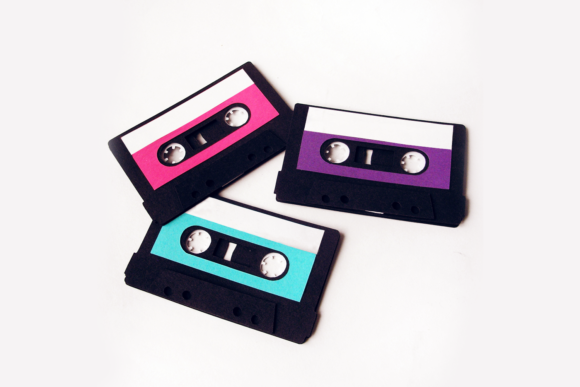
The Ultimate Guide to the 3D and Flat Mix Tape SVG: Bringing Retro Vibes to Modern Crafts
In an era dominated by digital streaming services, algorithmic playlists, and high-definition audio files, there is a distinct nostalgia that washes over us when we think of physical music media. Playlists are awesome, offering convenience and endless variety at our fingertips. However, nothing beats the joy of a mix tape. There was a specific magic in the act of curating songs onto a physical cassette, writing out the tracklist on a label, and handing it to a friend as a tangible token of affection or friendship. Today, that sentiment is being revived through creative crafting, specifically with the versatile Mix Tape SVG design.
This guide explores how this unique design bridges the gap between retro aesthetics and modern cutting machine technology. Whether you are a beginner looking to start your first craft project or an experienced maker seeking new ideas for events and gifts, understanding the potential of the 3D versus flat mix tape format will unlock a world of creativity.
Why the Mix Tape Still Matters in Modern Life
Before diving into the technical aspects of the SVG file, it is essential to understand why this design resonates so deeply with creators today. The mix tape represents intentionality. In a world where music is often background noise, creating a mix tape required hours of thought, selection, and labor. It was a personal statement.
Modern crafters are embracing this "analog" feel through digital tools. Using a Cricut Explore or Silhouette machine to cut vinyl or cardstock allows us to recreate that tactile experience without the hassle of actual magnetic tape. The Mix Tape SVG serves as a perfect vessel for this expression, allowing users to create:
- Event Decorations: Place cards for themed parties or name tags for workshops.
- Personalized Gifts: Custom labels for friends that mimic the classic aesthetic of the 90s.
- Home Decor: Wall art that adds a pop of color and nostalgia to any room.
The significance lies not just in the object itself, but in the story it tells. It connects the past with the present, making it a highly relevant topic for those interested in DIY culture, event planning, and creative expression.
Understanding the Versatility: Flat vs. 3D Designs
One of the most compelling features of this specific Mix Tape SVG is its dual-purpose nature. Unlike standard designs that are strictly two-dimensional, this file is engineered to be used either flat or as a 3D design. This flexibility is what sets it apart from other clipart available online.
The Flat Aesthetic
When used flat, the design functions like a traditional sticker or decal. You can cut it out of colored vinyl, cardstock, or even iron-on transfers. In this format, it is perfect for:
- Journaling and Scrapbooking: Adding a visual element to memory pages about music or travel.
- Labeling: As mentioned, writing on the label area creates totally rad name tags or place cards for dinner parties.
- Digital Design: Using the PNG reference file to create digital invitations or social media graphics.
The 3D Effect: Bringing Depth to Your Craft
The true magic happens when you embrace the three-dimensional aspect. The design includes multiple layers representing the different parts of a cassette (the shell, the window, and the spools). To achieve the 3D effect, simply use foam tape or other raised adhesive between the layers before adhering them to your base material.
This technique transforms a simple paper cutout into a textured, tactile object. When light hits the layered cassettes, shadows play across the surfaces, mimicking the look of real plastic. This is particularly effective for:
- Party Favors: Guests love interacting with objects that have depth.
- Display Boards: Creating a "Wall of Sound" display for music-themed events.
- Gift Tags: Attaching a mini 3D cassette to a gift box adds an unexpected and delightful surprise.
Note: Instructions included with the download ensure that even beginners can master the layering process without frustration.
Technical Specifications and File Formats
To fully utilize this design, it is crucial to understand the file formats provided. Different machines and software require specific types of files. Here is a breakdown of the formats included in this package and how they fit into your workflow.
SVG: The Standard for Cutting Machines
The SVG (Scalable Vector Graphics) file is the heart of this product. It is fully editable and designed specifically for use with Cricut Design Space, Silhouette Studio, Brother ScanNCut, and various other cutting machines.
Because SVGs are vector-based, you can resize the design to any dimension without losing quality. Whether you need a tiny tag for a favor bag or a massive banner for a wall, the lines remain crisp. This format allows you to manipulate individual layers, change colors, and arrange the elements exactly as you desire before sending them to your cutter.
PNG: For Reference and Printing
While the SVG is for cutting, the PNG (Portable Network Graphics) file serves a different purpose. It is a non-cuttable image, meaning it cannot be sent directly to a Cricut or Silhouette for cutting. Instead, it is ideal for:
- Print-and-Cut Projects: Sending the image to a home printer to print on cardstock, which you then cut out by hand.
- Graphic Design Software: Importing the image into Adobe Illustrator or Canva to add text or combine with other elements.
- Reference: Seeing exactly how the colors should look if you were to paint or draw it yourself.
Important Note: Colors in the PNG file are fixed. If you want to change the colors of the cassette, you must do so in your design software before printing or use the SVG file to cut different colored materials.
DXF: For Professional and Industrial Use
For those working with more specialized machinery, the DXF (Drawing Exchange Format) file is included. This format is compatible with various other machines and software such as Graphtec plotters and AutoCAD. If you are involved in industrial prototyping, architectural modeling, or using large-format commercial cutters, the DXF ensures precision and compatibility.
How to Get Started with Your Project
Ready to make something? Here is a simple roadmap to getting the most out of your Mix Tape SVG:
- Select Your Material: Choose cardstock for a sturdy 3D effect, vinyl for stickers, or fabric for appliqué.
- Import the File: Open your design software (e.g., Cricut Design Space) and upload the SVG file.
- Arrange Layers: Separate the layers if necessary. For the 3D version, ensure the top, middle, and bottom layers are distinct.
- Add Personalization: Use the text tool to write song titles, names, or dates on the label section.
- Assemble: Cut out your pieces. For the 3D look, apply small squares of foam tape to the back of the upper layers.
- Adhere: Stick the layers together, pressing firmly to secure the bond.
Clarifying Common Misunderstandings
There are a few common assumptions new crafters might have regarding this type of design. First, some believe that 3D effects require expensive equipment. This is incorrect; basic household items like foam tape or even folded paper strips work perfectly well. Second, many assume that "editable" means the colors change automatically. While the SVG allows you to assign colors to different layers, you still need to choose the physical material color or ink color manually. Finally, while the design is inspired by old cassettes, it does not require any magnetic properties or electronic components—it is purely decorative.
Conclusion: A Timeless Creative Tool
The Mix Tape SVG is more than just a download; it is a bridge to a simpler time, adapted for the modern crafter. Its ability to function as both a flat graphic and a dimensional object makes it incredibly versatile for business owners selling custom decor, teachers organizing classroom activities, or parents hosting birthday parties.
By leveraging the power of cutting machines and the charm of retro design, you can create projects that are not only visually stunning but also emotionally resonant. So, grab your machine, select your favorite colors, and start building your own playlist of memories. After all, nothing beats the joy of a mix tape.