Photoshop Nature Layer Style: A 3D Effect Solution
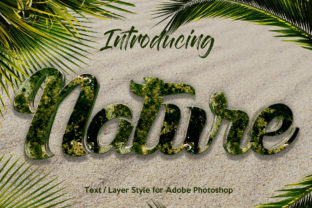
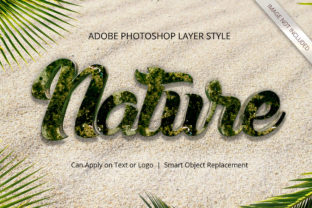
The visual landscape of digital design is constantly evolving, with a persistent demand for depth and realism in typography and graphical elements. Among the various tools available to achieve this, the Photoshop Nature Layer Style has emerged as a specialized solution designed to transform flat designs into immersive three-dimensional compositions. This resource focuses on integrating organic textures and natural lighting effects directly into text and shapes, creating a tactile appearance that mimics real-world materials found in nature.
For designers seeking to add dimensionality without the steep learning curve associated with complex 3D modeling software, this style offers a streamlined workflow. It bridges the gap between traditional graphic design and advanced photorealism by leveraging the native capabilities of Adobe Photoshop. The core philosophy behind this tool is accessibility; it allows users to produce high-quality results through simple interactions rather than intricate manual adjustments.
Understanding the Core Mechanism
At its foundation, the Photoshop Nature Layer Style operates on the principle of Smart Object technology. Unlike standard layer styles that require manual manipulation of shadows, bevels, and gradients for every new element, this system encapsulates the complexity within a pre-configured template. When a user imports their content, the software automatically applies a suite of effects that simulate natural environmental conditions, such as mossy textures, stone surfaces, or wooden grain.
The process eliminates the need for manual blending mode adjustments or custom pattern overlays. Instead, the entire aesthetic is contained within a single smart object container. This means that when a designer replaces the placeholder content with their own text or vector shape, the 3D effect recalibrates instantly. The result is a consistent look across all elements, regardless of the font size or shape geometry used.
Key Features and Technical Specifications
The utility of this design asset lies in its robust technical structure, which supports professional-grade output standards. Several specific attributes contribute to its versatility:
- High Resolution and DPI: Files are prepared at 300 DPI, ensuring that the final output remains crisp and detailed even when printed on large formats or viewed on high-density displays. This makes the style suitable for both web graphics and physical marketing materials.
- Smart Object Replacement: The workflow relies entirely on replacing the smart object. Users simply drag their design into the designated area, and the 3D transformation occurs automatically. There is no requirement to manually map textures or adjust light sources.
- Extensive Editability: With 100% editable properties, designers can alter colors, fonts, and dimensions without breaking the integrity of the 3D effect. The underlying structure adapts to these changes while maintaining the natural texture overlay.
- Layer Organization: The file structure is meticulously organized. Layers are grouped logically, making it easy for users to locate specific settings if they wish to tweak individual parameters, such as shadow intensity or surface roughness.
Evaluating Benefits for Designers
The primary advantage of adopting the Photoshop Nature Layer Style is the significant reduction in time required to achieve a polished look. In a traditional workflow, creating a convincing 3D text effect that incorporates natural elements could take hours of rendering and compositing. This tool compresses that timeline into minutes. By automating the application of complex lighting and texture maps, it allows designers to focus on the creative concept rather than the technical execution.
Furthermore, the consistency provided by the smart object system ensures brand uniformity. Whether a designer is working on a logo, a poster, or a social media banner, the 3D effect maintains the same quality and aesthetic logic across different applications. This reliability is crucial for professional environments where version control and asset consistency are paramount.
Tradeoffs and Considerations
While the efficiency gains are substantial, there are tradeoffs to consider when selecting this approach over other methods. The most notable limitation is the reliance on the specific aesthetic of the included textures. Because the style is pre-configured to mimic nature, it may not be the ideal choice for projects requiring futuristic, metallic, or abstract geometric themes. The "nature" aspect is intrinsic to the design, and deviating from this theme might result in a visual mismatch.
Additionally, while the tool reduces the skill barrier, it does not eliminate the need for design judgment. Placing a heavy, textured 3D effect over a busy background can reduce readability. Designers must still apply principles of contrast and composition to ensure the text remains legible. The tool provides the effect, but the designer must determine the appropriate context for its use.
Situational Fit and Alternatives
This resource is particularly well-suited for branding campaigns related to outdoor industries, eco-friendly products, wellness services, and food and beverage sectors where organic imagery resonates with the target audience. It is also an excellent fit for event posters, book covers, and album art that aim to evoke a sense of groundedness or rustic elegance.
However, situations may arise where alternatives are more appropriate. If a project requires dynamic, interactive 3D elements that change based on user input, a web-based 3D library or a dedicated 3D modeling application like Blender would be necessary. Similarly, if the design brief calls for a highly stylized, non-realistic look, standard Photoshop layer styles (without the nature-specific templates) or custom vector illustrations might offer greater flexibility.
For users who require complete control over every light source, refraction, and material property, manual 3D extrusion in Photoshop offers a deeper level of customization. However, this comes at the cost of significantly higher time investment and a steeper learning curve. The Photoshop Nature Layer Style sits in the middle ground, offering a balance between automation and artistic control.
Decision-Making Insights
To determine if this tool aligns with your current goals, evaluate the following criteria:
- Project Timeline: Is there a deadline that necessitates rapid production of high-fidelity 3D assets? If yes, this style is likely a strong candidate.
- Aesthetic Requirements: Does the project benefit from organic, earthy, or textured visuals? If the theme is industrial or minimalist, this specific style may not be the best fit.
- Technical Proficiency: Do you have access to team members with advanced 3D modeling skills? If not, relying on a smart object-based system ensures professional results without specialized training.
- Output Medium: Will the design be printed at large scales? The 300 DPI resolution ensures this tool meets print standards, whereas lower-resolution presets might fail in this context.
In conclusion, the Photoshop Nature Layer Style represents a practical evolution in digital design workflows. By removing the technical barriers associated with 3D texturing, it empowers designers to create sophisticated, nature-inspired visuals with ease. While it is not a universal solution for every design challenge, its specific strengths make it an invaluable asset for professionals looking to enhance their portfolio with high-quality, dimensional graphics efficiently.