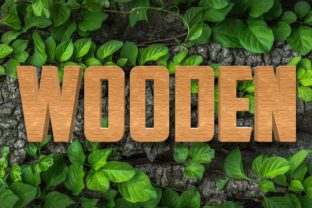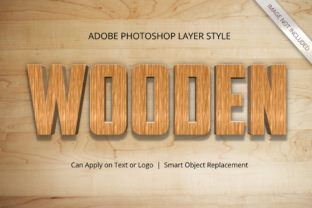
Photoshop Wood Timber Board Text Effect: Transforming Simple Typography into Tactile Realism
There is a distinct psychological impact when text feels like it belongs in the physical world. When you see a sign that looks like it has been carved into an old oak plank or painted onto a rustic shipping crate, your brain immediately registers authenticity and warmth. This is where the Photoshop Wood Timber Board Text Effect steps in as a game-changer for designers who want to bridge the gap between digital flatness and tangible texture without needing advanced sculpting skills.
This specific effect goes beyond simple drop shadows or basic layer styles. It simulates the grain, depth, knots, and weathering of actual wood, turning standard fonts into three-dimensional objects that look ready to be mounted on a wall. The beauty of this approach lies in its accessibility; you do not need to be a 3D modeling expert to achieve results that rival professional renderings. By leveraging smart object technology, the entire process becomes a matter of replacement rather than reconstruction.
Real-World Applications Beyond the Design Studio
While many people associate this style with graphic design portfolios, the utility of a high-quality timber board effect extends far into practical business scenarios. Imagine a local coffee shop owner wanting to create a menu board that matches their vintage interior. Instead of hiring a carpenter to build a custom wooden sign and paying for expensive printing services, they can use this Photoshop technique to visualize exactly how their logo would look etched into reclaimed barn wood.
The versatility shines brightest in the hospitality industry. Restaurants often need seasonal menus, daily specials, or event posters that convey a cozy, farm-to-table atmosphere. A clean, white digital flyer might look professional, but a digital mockup featuring the text embedded into a dark walnut timber board instantly communicates a sense of tradition and quality ingredients. Similarly, breweries and wineries frequently utilize this aesthetic to label their limited-edition releases, making the product feel handcrafted and exclusive.
For event planners, the implications are equally significant. Weddings, corporate retreats, and music festivals all rely heavily on signage to set the mood. A "Welcome" sign made from light pine with visible grain textures creates an inviting entrance for a wedding, while a distressed, darker wood effect fits perfectly for a rock concert or a rugged outdoor adventure festival. The ability to swap out the text within seconds means planners can iterate through different venue names or dates without starting from scratch every time.
Who Benefits Most from This Versatile Tool?
The audience for such a specialized tool is surprisingly broad, spanning various industries that prioritize visual storytelling. Small business owners and entrepreneurs are perhaps the biggest beneficiaries. In a crowded marketplace, branding needs to stand out. A logo presented on a sleek metal background says one thing, but the same logo on a textured wood surface suggests reliability, heritage, and organic values. For startups focusing on sustainability or artisanal products, the Photoshop Wood Timber Board Text Effect provides an instant visual language that resonates with eco-conscious consumers.
Content creators and social media influencers also find immense value here. Platforms like Instagram and Pinterest thrive on aesthetics that feel curated and authentic. Posts featuring mockups of wooden signs, framed quotes, or rustic product labels often garner higher engagement because they mimic the real-world environment where users expect to see these items. Influencers promoting home decor, DIY projects, or lifestyle brands can generate content that looks like a photograph of a physical object, even if the image was created entirely digitally.
Even large-scale marketing agencies leverage this effect for client presentations. When pitching a rebranding campaign to a client who owns a chain of hardware stores or a woodworking business, showing them a flat vector logo is rarely enough. Presenting a dynamic mockup where the new brand identity is applied to a realistic timber board helps the client visualize the end result in their retail space. This visualization capability reduces uncertainty and accelerates the approval process.
Practical Considerations Before You Begin
Although the tool is designed to be user-friendly, achieving a truly convincing result requires attention to context. One of the most common pitfalls is ignoring the lighting direction. If your wood texture has shadows falling from left to right due to a simulated sun source, your text must follow suit. If the typography appears to be floating above the wood without interacting with the light, the illusion breaks. High-resolution files, typically at 300 DPI, are essential here to ensure that the fine details of the wood grain do not pixelate when zoomed in or printed.
Another consideration is the choice of font. Not all typefaces work well with a heavy 3D timber style. Delicate, thin scripts might get lost against the busy texture of the wood grain, whereas bold, blocky serifs or sturdy sans-serifs tend to hold up better and look more integrated into the material. The goal is harmony between the letterform and the medium. If the text looks too modern or sterile against a rough, aged piece of timber, it can create a jarring contrast that undermines the intended rustic vibe.
Users should also consider the scale of the final output. While the effect looks stunning on a computer screen, printing it requires specific preparation. The 100% editable nature of the layers allows for adjustments before export, ensuring that the kerning and spacing remain perfect. However, if the design involves very small text, the complexity of the wood texture might make it difficult to read. In such cases, simplifying the texture overlay or choosing a smoother section of the wood board is advisable.
Why Smart Objects Make All the Difference
The core strength of this specific effect lies in its reliance on smart objects. Traditional methods of creating 3D text effects often involve complex mesh manipulation that locks the designer into a rigid workflow. Once a shape is extruded or beveled, changing the text usually requires rebuilding the geometry. With the Photoshop Wood Timber Board Text Effect, the workflow is fluid. You simply double-click the smart object, replace your text, save the file, and watch as the 3D styling, shadows, and grain mapping update automatically across the entire composition.
This feature is a massive time-saver for projects requiring variations. Perhaps you are designing a series of promotional banners for a lumber company. You need the main headline, but also sub-headlines for different regions or promotions. With a standard setup, this could take hours. With the smart object method, you can generate ten different versions in minutes by just swapping the text content. The consistency of the wood texture remains intact, ensuring a cohesive brand look across all materials.
Furthermore, the organization of layers plays a crucial role in long-term usability. Well-organized files allow other team members to pick up the project later without confusion. They can easily locate the text layer, the wood texture mask, or the shadow adjustments. This clarity prevents errors and ensures that the high-quality resolution is maintained throughout the editing process. Whether you are working alone or collaborating with a team, the structured approach of this effect guarantees that the final output remains crisp and professional.
Maximizing Impact Through Customization
While the preset effect provides a fantastic foundation, the true magic happens when you tweak the variables. Don't be afraid to adjust the opacity of the wood grain over the text to create a faded, weathered look. Or, try increasing the contrast of the wood texture to make the letters pop with greater definition. The 3D Effect Style is not static; it is a living template that adapts to your creative vision.
Consider the color palette of the wood itself. While natural browns are classic, tinting the wood slightly red or blue can match a brand's color scheme while retaining the organic feel. This level of customization ensures that the Photoshop Wood Timber Board Text Effect never looks generic. It becomes a unique asset tailored specifically to the project's needs.
In conclusion, transforming flat text into a tactile, three-dimensional reality does not require a degree in 3D modeling or years of experience. By utilizing tools designed with high resolution, easy editing, and smart object capabilities, anyone can produce professional-grade graphics. Whether you are crafting a rustic wedding invitation, a commercial advertisement for a construction firm, or a stylish social media post, this effect offers a versatile solution that adds depth, character, and realism to your designs. It turns words into objects, and ideas into experiences.