Exploring the 12 Sided 3D Gem for Advanced Paper Crafting
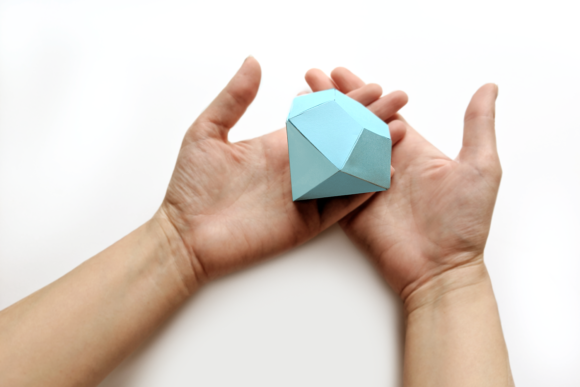
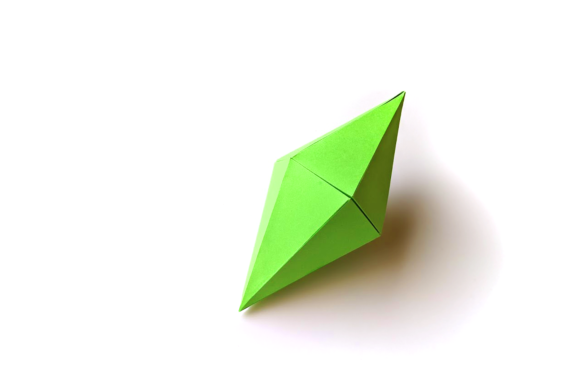
The 12 Sided 3D Gem represents a sophisticated intersection of geometric design and paper engineering. Unlike standard flat cutouts or simple origami, this specific project requires precise assembly to achieve a complex polyhedral structure that mimics the facets of a precious stone. For hobbyists and professionals alike, the appeal lies not just in the final aesthetic but in the versatility of the digital assets provided. This design is engineered specifically for modern electronic cutting machines, yet it remains accessible to those who prefer traditional manual methods.
When evaluating crafting resources, the primary differentiator of this gem design is its multi-format availability. It is not merely a single image file; it is a comprehensive kit designed to accommodate various workflows. Whether you are operating a Cricut Explore, a Silhouette machine, or working entirely by hand with scissors and glue, the core geometry remains consistent. The finished product measures approximately 3 inches wide at its base and expands to roughly 6.75 inches once fully assembled. This scale offers a substantial presence on a desk or in a display case without becoming unwieldy.
Understanding the Design Architecture
The fundamental challenge of creating a twelve-sided object from flat material lies in the precision of the angles and the alignment of the edges. A successful 12 Sided 3D Gem relies on the user's ability to follow strict technical instructions. The design includes pre-determined fold lines and cut paths that ensure the facets meet correctly to form a closed shape. If the angles are even slightly off during the cutting phase, the final assembly will fail to close properly, leaving gaps or misaligned surfaces.
This requirement for precision makes the choice of tool critical. Electronic cutting machines offer a level of accuracy that is difficult to replicate manually. However, the inclusion of a PDF version for hand-cutting democratizes access to this craft. It acknowledges that not every enthusiast has invested in expensive hardware. The tradeoff here is time versus precision. Hand-cutting allows for tactile engagement and does not require electricity, but it demands significantly more patience and steady hands to maintain the integrity of the gem's sharp edges.
Comparing Digital File Formats
The decision-making process for users often centers on which file format best suits their current setup. The ecosystem surrounding this design supports three primary formats: SVG, DXF, and Print-and-Cut PDF.
- SVG (Scalable Vector Graphics): This is the preferred format for users of Cricut Design Space, Silhouette Studio, and Brother machines. SVG files allow for non-destructive scaling within the software. This means you can resize the gem to fit your specific project needs without losing vector quality. However, there is a crucial rule for resizing: all individual pieces must be scaled simultaneously. If one facet is resized differently than another, the structural integrity of the 3D model is compromised, and the pieces will no longer fit together.
- DXF: Designed for compatibility with a broader range of industrial and hobbyist software like Graphtec and AutoCAD. Users who rely on CAD programs for architectural modeling or intricate engineering projects may find the DXF format more suitable. It ensures that the geometric data remains intact when imported into professional design environments.
- Print-and-Cut PDF: This format serves as the bridge between digital planning and physical execution. It is optimized for standard printers and subsequent hand-cutting. While it lacks the direct "cut" command of an SVG, it provides clear visual guides for where to score and where to slice.
Evaluating Tool Compatibility and Workflow
One of the most significant factors in choosing a digital craft resource is the ease of integration with your existing software. For Cricut users, the experience has evolved over recent updates. Historically, uploading designs to Cricut Design Space was a straightforward drag-and-drop operation. However, technical changes in browser compatibility have introduced occasional friction points.
Users encountering issues with Chrome when attempting to upload the 12 Sided 3D Gem design should consider switching to Firefox. This workaround addresses known compatibility glitches that affect how certain vector files render in the cloud-based interface. This nuance highlights the importance of understanding the technical environment before starting a project. A design might be perfect in theory, but if the workflow is blocked by browser limitations, the user experience suffers.
In contrast, Silhouette and Brother machine users often operate with different software ecosystems that may handle these uploads differently. The flexibility of the SVG format ensures that regardless of the brand of cutter used, the underlying geometry remains compatible. This cross-platform support is a major advantage for makers who own multiple devices or who frequently switch between different types of equipment.
The Tradeoffs of Manual vs. Machine Cutting
While electronic cutters provide speed and uniformity, they do come with limitations regarding material thickness and cost. Using a Cricut or Silhouette requires specific blades and mats, which add to the operational cost. Furthermore, the speed of the machine is only beneficial if the user has a large volume of materials to process. For a single project like the 3D Gem, the time saved might be marginal compared to the setup time required to load the mat and align the blade.
Conversely, the hand-cut option using the included PDF offers a slower, more meditative approach. It eliminates the need for specialized consumables like cutting mats and blades. The downside is the potential for human error. When cutting by hand, slight deviations in the line can result in a gap in the final gem. To mitigate this, the instructions emphasize scoring the fold lines before cutting the outer edges. This technique softens the paper fibers, allowing for crisp, clean folds that are essential for the 3D structure to hold its shape.
Decision Factors for Selecting the Right Approach
Choosing whether to use the 12 Sided 3D Gem design depends heavily on the intended outcome and the resources available. If the goal is to create a mass-produced set of decorations for an event, the electronic cutting route is superior due to consistency and speed. The ability to scale the SVG file allows for quick adjustments to match different table sizes or display requirements.
However, if the project is a personal gift or a standalone art piece, the manual method may offer a unique charm. The slight imperfections inherent in hand-cutting can sometimes enhance the organic feel of the final object. Additionally, for those who do not wish to invest in a cutting machine, the PDF option ensures that the high-quality design is still accessible. It removes the barrier to entry, allowing anyone with a printer and scissors to participate in the craft.
Another consideration is the complexity of the assembly. Regardless of the cutting method, the assembly process remains the same. The user must carefully fold along the scored lines and adhere the tabs in the correct sequence. This step requires focus and patience. The design is robust enough to withstand minor handling errors, but rushing the gluing process can lead to a collapsed structure. Therefore, the best approach is to view the cutting phase as preparation and the folding phase as the critical construction moment.
Maximizing the Potential of the Design
To get the most out of this resource, users should treat the file formats as flexible tools rather than rigid constraints. For example, a user with a Cricut machine might choose to print the PDF version first to test the size and assembly logic before committing to cutting expensive cardstock with the machine. This hybrid approach combines the safety of manual testing with the efficiency of machine production.
Furthermore, the scalability of the SVG file invites creative experimentation. While the default dimensions are 3 by 6.75 inches, there is no restriction on making the gem larger for wall displays or smaller for jewelry components. As long as the proportional scaling is maintained across all pieces, the geometry holds true. This adaptability makes the 12 Sided 3D Gem a versatile asset for various design challenges, from educational models to decorative centerpieces.
Ultimately, the value of this design lies in its thoughtful preparation for diverse user needs. By providing SVG, DXF, and PDF options, it respects the varying levels of technological adoption among crafters. It avoids forcing a single workflow onto the user, instead offering a toolkit that adapts to the maker's environment. Whether you are navigating browser quirks in Design Space or carefully tracing lines with a craft knife, the end result is a stunning, mathematically precise representation of a gemstone crafted from paper.